An operations dashboard,
governed by multisig
Roles, lockups, blacklists and multisig approvals in one screen. Operate with buttons instead of code, with risky actions routed through several approvers. See the demo, built exactly like the real thing.
New to admin dashboards?
In simple terms, the admin page is a control room where you run your token and NFTs by pressing buttons, with no coding.
Complex contract commands turned into buttons, like an ATM screen. Transfers, pauses and lockups are a button away, and critical actions go through approval.
We also build on tokens and NFTs you have already issued. Our own contracts integrate most smoothly, and existing contracts get a structure and permissions review first.
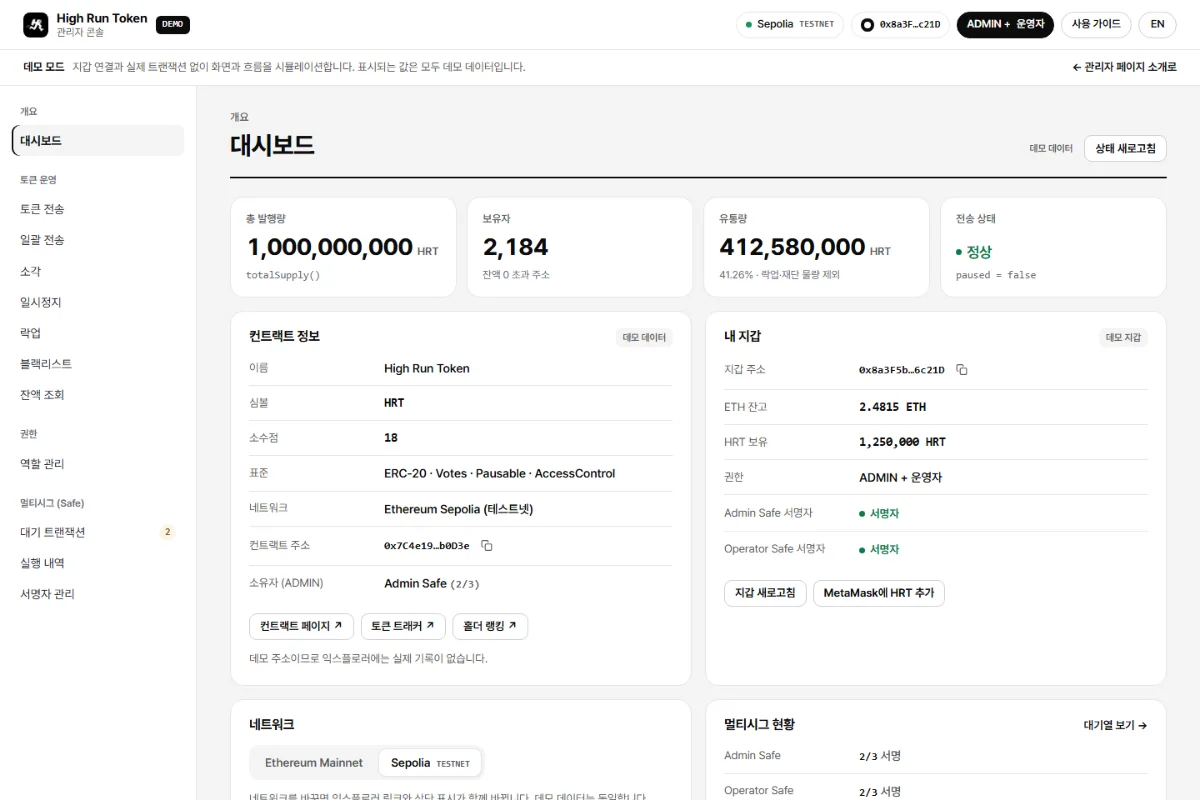
Token admin dashboard demo
A demo anyone can open and explore without a wallet. No real transactions take place. The dashboard we deliver only admits wallets verified as admins.
- Same layout as the dashboards we deliver
- Multisig (Safe) propose, sign and execute flow
- Actions marked by risk level
- Plain-language help on every control
Dashboard features
Features your admin page can include
We pick only the features your project needs and build a custom dashboard. Open a feature to see an example.
No per-feature fee. The admin page is a one-time cost, and adding more controls does not add per-feature charges. Exact pricing comes with your quote.
Supported mainnets (chains)
You can run tokens and NFTs on any chain from the admin page.
Admin Page Features
19An admin web app that lets you operate tokens and NFTs with no coding, just by connecting a wallet. The features below are included together in the admin page development quote.
Dashboard & Operations Screens
3Admin Dashboard
An admin-only web screen that lets you operate tokens and NFTs with just button clicks, without any complicated coding.
Staking Dashboard
An operations screen where you can review and handle the tokens users have staked (deposited) and the rewards earned on them, all on one screen.
NFT Minting Management Dashboard
A management screen for operating an NFT collection with buttons, no coding required.
Access & Permissions
3Role-Based Access Control (AccessControl)
KEYAssigns each wallet a role (position) so that only the features and screens appropriate to that role are visible and usable.
Wallet Connect Login
Instead of an ID and password, you verify your identity and log in simply by connecting a wallet like MetaMask.
Grant / Revoke Permissions
Grants a specific wallet a new operator or admin role, or revokes permissions that are no longer needed.
Multisig
3Multisig Operations (Propose, Approve, Execute)
KEYAdvancedImportant tasks like token minting can't be executed by one person alone; they only execute once a set number of people or more agree (sign) together.
Signer Management
You can add or remove the signers who take part in co-approval, and also change the number of agreements required for execution.
Execution History
Shows the record of every task processed through co-approval at a glance.
Asset Management
6Pause / Resume
If an emergency arises, briefly halts all token transfers, and restores them to normal once the problem is resolved.
Lockup Management
Locks a specific wallet's tokens so they can't be moved for a set period, and handles extending the period, partial release, and status lookups.
Blacklist Management
Adds problematic wallets to a block list or removes them, and also checks the current block status.
Batch Transfer (Airdrop)
A feature that sends tokens to many wallets at once, used for mass distribution (airdrop).
Transfer & Burn
Sends tokens to another wallet, or permanently destroys (burns) them to reduce the total supply.
Withdraw Sales Proceeds
Safely moves the coins collected from a token sale or NFT minting into an operations wallet.
Lookup & Convenience
3Balance & Status Lookup
Instantly checks information like a wallet's holdings, lockup status, and total supply, at no extra cost.
Explorer Shortcut
Jumps straight to a blockchain lookup site like Etherscan to easily check transaction history.
Built-in User Guide & Color Cues
Provides Korean explanations and risk-level color coding together so that even those new to blockchain can follow along easily.
Custom Builds
1Custom Addition of Needed Admin Features
KEYEven for operations features not listed here, just describe what you want and we'll add them to your admin screen.
NFT admin is available too. The demo above is a token (High Run Token) management example, but in the same way we build dashboards for minting, whitelist, reveal and royalty management of collections like High Run Poker Club (HRPC).
An ops tool you use from day one after launch
Tell us which controls you need and we will assemble a dashboard you can run yourself.